
My step-by-step guide
How to Search for Disney Resorts in Interval International
I’ll show you how to look for availability at Disney Vacation Club resorts through Interval International—whether using Club Points or a week.
I’ll admit that I haven’t used Interval very much since Marriott introduced points, but once you know where to look, you can search yourself. The labels you see may differ by account and can change.
1. Sign in and choose your active Interval account
Go to Interval International and sign in. Select your active Interval membership if prompted.
2. Open the exchange search
Under Exchange, look for Vacation Exchange. Your account may offer an eligible Abound / Club Points option or a deposited week. Choose the option that matches what you own and intend to use; week exchange rules and trading power differ from Club Point requirements.
3. Search by resort codes and dates
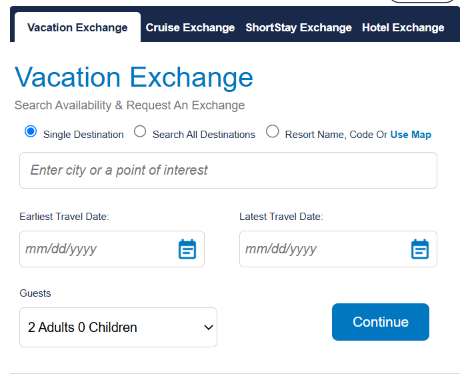
Select “Resort Name, Code Or Use Map.” You can search for one resort at a time, or all of them at the same time. I recommend you copy and paste the complete list of codes (see all codes below) into the appropriate window and search for all of them. If you create your own list of resorts, just separate the codes with a comma. I also recommend putting in the largest range of dates possible. Since my schedule is flexible, I put in all available dates for the entire two years. Add the right number of guests, then click through the next screen by selecting “Vacation Exchange.”
4. Choose your exchange and villa size
If you are using Club Points for the reservation, select the Abound option by selecting the “Vacation Exchange” link. Or if it is a week, select the corresponding week you want to trade.
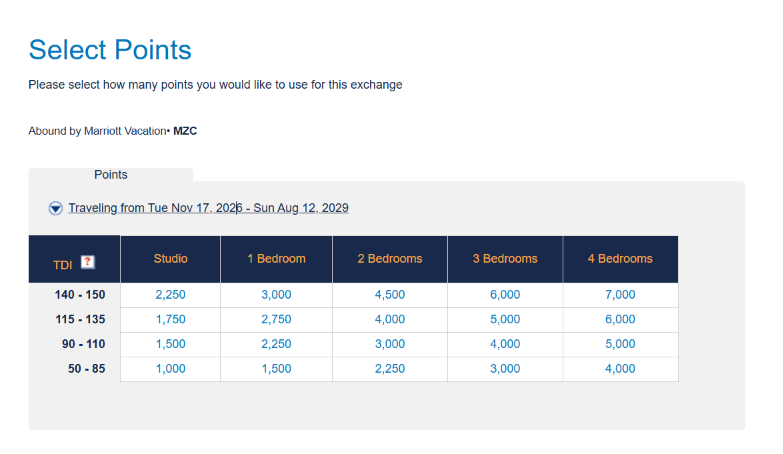
Then select which size villa you want. I select from the top row of 140–150 (TDI) to align with the highest Travel Demand Index in my Disney resort searches. Check the TDI and point requirement for your dates on the current screen.
5. Read the results before deciding
If there is availability at a Disney resort, it will be listed along with the villa capacity, number of points required, and cash fee. Review the options carefully, and make the exchange that works for you.
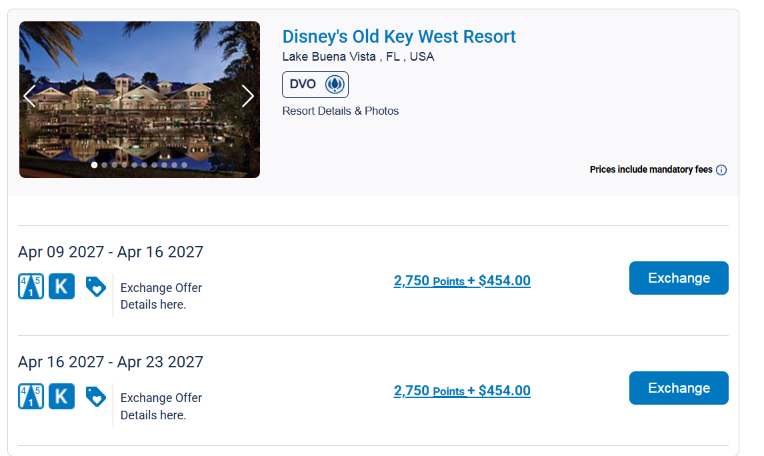
In my example, the added fee shown is for the exchange to a resort outside the MVC family plus the mandatory resort fee for Disney properties. You can see the breakdown of the charges by selecting the link on the points and cash fees.
Searching lets you learn what is possible; make any reservation only after you’ve reviewed your options.
Disney resort codes to copy
These are the Disney resorts I found listed in Interval International as of November 2026. If you want to search for all of them, simply copy the codes and insert them into Interval’s resort-name/code search box.
Before you book
- Compare the exact villa, dates, occupancy, points or deposited week, and any separate cash charges.
- Confirm exchange fees, possible resort-service fees, cancellation and applicable travel rules with Interval and the resort.
- Disney resort-guest benefits and DVC member-only benefits are different. Check the current Disney terms for your stay.
Recent Comments